<?xml version="1.0" encoding="utf-8"?><feed xmlns="http://www.w3.org/2005/Atom" ><generator uri="https://jekyllrb.com/" version="3.10.0">Jekyll</generator><link href="http://blog.tom86.top/atom.xml" rel="self" type="application/atom+xml" /><link href="http://blog.tom86.top/" rel="alternate" type="text/html" /><updated>2026-06-04T06:17:29+00:00</updated><id>http://blog.tom86.top/atom.xml</id><title type="html">Tom’s Blog</title><subtitle>博客</subtitle><author><name>ZhaoTao</name></author><entry><title type="html">ipv6配置</title><link href="http://blog.tom86.top/linux/2021/09/05/linux-ipv6/" rel="alternate" type="text/html" title="ipv6配置" /><published>2021-09-05T04:51:00+00:00</published><updated>2021-09-05T04:51:00+00:00</updated><id>http://blog.tom86.top/linux/2021/09/05/linux-ipv6</id><content type="html" xml:base="http://blog.tom86.top/linux/2021/09/05/linux-ipv6/"><![CDATA[<p>问题：ip -6 addr add 240c:4044:1204:1303:c282:a7ff:ad3c:6b06/64 dev eth0
RTNETLINK answers: Operation not supported</p>

<h4 id="查看ipv6内核模块的编译方式">查看ipv6内核模块的编译方式</h4>
<div class="language-bash highlighter-rouge"><div class="highlight"><pre class="highlight"><code><span class="nb">grep </span>IPV6 /boot/config-<span class="sb">`</span><span class="nb">uname</span> <span class="nt">-r</span><span class="sb">`</span>
<span class="nv">CONFIG_IPV6</span><span class="o">=</span>m
</code></pre></div></div>
<h4 id="检查ipv6是否加载">检查ipv6是否加载</h4>
<div class="language-plaintext highlighter-rouge"><div class="highlight"><pre class="highlight"><code>lsmod |grep ipv6
ipv6 331253  3 ib_ipoib,rdma_cm,ib_core
</code></pre></div></div>

<h4 id="检查ipv6的加载参数disable1表明ipv6功能被关闭">检查ipv6的加载参数(disable=1表明ipv6功能被关闭)</h4>
<div class="language-bash highlighter-rouge"><div class="highlight"><pre class="highlight"><code><span class="nb">cat</span> /sys/module/ipv6/parameters/autoconf
1<span class="o">(</span>此处为生效值<span class="o">)</span>
<span class="nb">cat</span> /sys/module/ipv6/parameters/disable
1<span class="o">(</span>此处为生效值<span class="o">)</span>
<span class="nb">cat</span> /sys/module/ipv6/parameters/disable_ipv6
0<span class="o">(</span>此处为生效值<span class="o">)</span>
</code></pre></div></div>

<h4 id="查看参数含义">查看参数含义</h4>
<div class="language-plaintext highlighter-rouge"><div class="highlight"><pre class="highlight"><code>modinfo ipv6
filename:       /lib/modules/3.10.0_3-0-0-17/kernel/net/ipv6/ipv6.ko
alias:          net-pf-10
license:        GPL
description:    IPv6 protocol stack for Linux
author:         Cast of dozens
rhelversion:    7.2
depends:
intree:         Y
vermagic:       3.10.0_3-0-0-17 SMP mod_unload
parm:           disable:Disable(此处为默认值) IPv6 module such that it isnon-functional (int)
parm:           disable_ipv6:Disable(此处为默认值) IPv6 on all interfaces(int)
parm:           autoconf:Enable(此处为默认值) IPv6 address autoconfigurationon all interfaces (int)
</code></pre></div></div>

<h4 id="设置ipv6模块参数">设置ipv6模块参数</h4>
<div class="language-plaintext highlighter-rouge"><div class="highlight"><pre class="highlight"><code>1. cat &lt;&lt; EOF &gt;&gt; /etc/modprobe.d/ipv6.conf
   options ipv6 disable=0
   EOF
2. reboot
</code></pre></div></div>

<h4 id="配置静态地址">配置静态地址</h4>
<div class="language-plaintext highlighter-rouge"><div class="highlight"><pre class="highlight"><code>1. vim /etc/sysconfig/network-scripts/ifcfg-eth0
   DEVICE="eth0"
   HWADDR=e4:3d:1a:1f:40:1e
   BOOTPROTO="static"
   IPADDR="10.81.76.141"
   NETMASK="255.255.255.192"
   ONBOOT="yes"    
   IPV6INIT=yes     (是否开机启用IPV6地址)
   IPV6_AUTOCONFI=no  (是否使用IPV6地址的自动配置)
   IPV6ADDR=240c:4044:1204:1303:c282:a7ff:ad3c:6b06 (IPV6地址)
   IPV6DEFAULTGW=240c:4044:1204:1300::defa (IPV6地址网关)
2. service network restart
</code></pre></div></div>]]></content><author><name>ZhaoTao</name></author><category term="Linux" /><summary type="html"><![CDATA[问题：ip -6 addr add 240c:4044:1204:1303:c282:a7ff:ad3c:6b06/64 dev eth0 RTNETLINK answers: Operation not supported]]></summary></entry><entry><title type="html">多网卡多ip在同一个网段</title><link href="http://blog.tom86.top/linux/2021/09/05/linux-arp/" rel="alternate" type="text/html" title="多网卡多ip在同一个网段" /><published>2021-09-05T01:51:00+00:00</published><updated>2021-09-05T01:51:00+00:00</updated><id>http://blog.tom86.top/linux/2021/09/05/linux-arp</id><content type="html" xml:base="http://blog.tom86.top/linux/2021/09/05/linux-arp/"><![CDATA[<p>问题：当某些特殊情况下，需要在同一个主机的多块网卡上配置同一个网段的地址，但linux系统默认系统配置是不支持这种配置的，会出现各种奇怪的问题，比如对于arp广播，多个网卡都会响应，对端交换机一般会记住返回最快的那个mac地址，但对于每次请求返回的快慢是不能保证一致的，所以会导致arp表不停变化；再比如对于icmp，默认返回只走第一条匹配的路由，即对于所有ip的请求都由一个网卡返回。</p>

<h4 id="解决方案">解决方案</h4>
<div class="language-bash highlighter-rouge"><div class="highlight"><pre class="highlight"><code>1.只处理目的ip属于当前网卡的arp请求，其他arp请求直接丢弃
  sysctl <span class="nt">-w</span> net.ipv4.conf.all.arp_ignore<span class="o">=</span>1
2.选择最优的arp源IP
  sysctl <span class="nt">-w</span> net.ipv4.conf.all.arp_announce<span class="o">=</span>2 
3.只处理反向路由指向接收网卡的报文
  sysctl <span class="nt">-w</span> net.ipv4.conf.all.rp_filter<span class="o">=</span>1
4.增加策略路由，假设eth0/1在同一个网段
  ip route add 0.0.0.0/0 dev eth0 table 1
  ip route add 0.0.0.0/0 dev eth1 table 2
  ip rule add from eth0-ip table 1
  ip rule add from eth1-ip table 2
</code></pre></div></div>
<h4 id="参数解释">参数解释</h4>
<div class="language-plaintext highlighter-rouge"><div class="highlight"><pre class="highlight"><code>参见：https://www.kernel.org/doc/Documentation/networking/ip-sysctl.txt
arp_ignore - INTEGER
	Define different modes for sending replies in response to
	received ARP requests that resolve local target IP addresses:
	0 - (default): reply for any local target IP address, configured
	on any interface
	1 - reply only if the target IP address is local address
	configured on the incoming interface
	2 - reply only if the target IP address is local address
	configured on the incoming interface and both with the
	sender's IP address are part from same subnet on this interface
	3 - do not reply for local addresses configured with scope host,
	only resolutions for global and link addresses are replied
	4-7 - reserved
	8 - do not reply for all local addresses

	The max value from conf/{all,interface}/arp_ignore is used
	when ARP request is received on the {interface}
arp_announce - INTEGER
	Define different restriction levels for announcing the local
	source IP address from IP packets in ARP requests sent on
	interface:
	0 - (default) Use any local address, configured on any interface
	1 - Try to avoid local addresses that are not in the target's
	subnet for this interface. This mode is useful when target
	hosts reachable via this interface require the source IP
	address in ARP requests to be part of their logical network
	configured on the receiving interface. When we generate the
	request we will check all our subnets that include the
	target IP and will preserve the source address if it is from
	such subnet. If there is no such subnet we select source
	address according to the rules for level 2.
	2 - Always use the best local address for this target.
	In this mode we ignore the source address in the IP packet
	and try to select local address that we prefer for talks with
	the target host. Such local address is selected by looking
	for primary IP addresses on all our subnets on the outgoing
	interface that include the target IP address. If no suitable
	local address is found we select the first local address
	we have on the outgoing interface or on all other interfaces,
	with the hope we will receive reply for our request and
	even sometimes no matter the source IP address we announce.

	The max value from conf/{all,interface}/arp_announce is used.

	Increasing the restriction level gives more chance for
	receiving answer from the resolved target while decreasing
	the level announces more valid sender's information.
rp_filter - INTEGER
	0 - No source validation.
	1 - Strict mode as defined in RFC3704 Strict Reverse Path
	    Each incoming packet is tested against the FIB and if the interface
	    is not the best reverse path the packet check will fail.
	    By default failed packets are discarded.
	2 - Loose mode as defined in RFC3704 Loose Reverse Path
	    Each incoming packet's source address is also tested against the FIB
	    and if the source address is not reachable via any interface
	    the packet check will fail.

	Current recommended practice in RFC3704 is to enable strict mode
	to prevent IP spoofing from DDos attacks. If using asymmetric routing
	or other complicated routing, then loose mode is recommended.

	The max value from conf/{all,interface}/rp_filter is used
	when doing source validation on the {interface}.

	Default value is 0. Note that some distributions enable it
	in startup scripts.
</code></pre></div></div>

<h4 id="原理解释">原理解释</h4>
<p>linux收到arp请求后的处理流程如下：</p>
<div class="language-bash highlighter-rouge"><div class="highlight"><pre class="highlight"><code>代码参考：https://github.com/torvalds/linux/blob/master/net/ipv4/arp.c
arp_rcv--&gt;arp_process--&gt;ip_route_input_noref--&gt;ip_route_input_slow--&gt;
fib_validate_source<span class="o">(</span>rp_filter参数生效<span class="o">)</span><span class="nt">--</span><span class="o">&gt;</span>arp_ignore<span class="o">(</span>arp_ignore参数生效<span class="o">)</span><span class="nt">--</span><span class="o">&gt;</span>
arp_filter<span class="o">(</span>arp_filter参数生效<span class="o">)</span>
1.由代码可知，arp模块的处理逻辑是与ip路由紧密相关的。
2.icmp及tcp/udp的处理都需要经过ip路由的入向和出向匹配的，此处就需要rp_filter参数<span class="o">(</span>入向<span class="o">)</span>及策略路由<span class="o">(</span>出向<span class="o">)</span>的支持。
</code></pre></div></div>

<h4 id="参考文档">参考文档</h4>
<ol>
  <li><a href="https://serverfault.com/questions/415304/multiple-physical-interfaces-with-ips-on-the-same-subnet">serverfault高分答案</a></li>
  <li><a href="https://www.cnblogs.com/guandaoren/p/14322210.html">推荐阅读：TCP/IP协议栈在Linux内核中的运行时序分析</a></li>
</ol>]]></content><author><name>ZhaoTao</name></author><category term="Linux" /><summary type="html"><![CDATA[问题：当某些特殊情况下，需要在同一个主机的多块网卡上配置同一个网段的地址，但linux系统默认系统配置是不支持这种配置的，会出现各种奇怪的问题，比如对于arp广播，多个网卡都会响应，对端交换机一般会记住返回最快的那个mac地址，但对于每次请求返回的快慢是不能保证一致的，所以会导致arp表不停变化；再比如对于icmp，默认返回只走第一条匹配的路由，即对于所有ip的请求都由一个网卡返回。]]></summary></entry><entry><title type="html">dpdk交叉编译</title><link href="http://blog.tom86.top/dpdk/2021/07/04/dpdk-cross-compile/" rel="alternate" type="text/html" title="dpdk交叉编译" /><published>2021-07-04T07:32:00+00:00</published><updated>2021-07-04T07:32:00+00:00</updated><id>http://blog.tom86.top/dpdk/2021/07/04/dpdk-cross-compile</id><content type="html" xml:base="http://blog.tom86.top/dpdk/2021/07/04/dpdk-cross-compile/"><![CDATA[<table>
  <thead>
    <tr>
      <th style="text-align: left">缩写</th>
      <th style="text-align: center">cpu型号</th>
    </tr>
  </thead>
  <tbody>
    <tr>
      <td style="text-align: left">wsm</td>
      <td style="text-align: center">Westmere</td>
    </tr>
    <tr>
      <td style="text-align: left">nhm</td>
      <td style="text-align: center">Nehalem</td>
    </tr>
    <tr>
      <td style="text-align: left">snb</td>
      <td style="text-align: center">Sandy Bridge</td>
    </tr>
    <tr>
      <td style="text-align: left">ivb</td>
      <td style="text-align: center">Ivy Bridge</td>
    </tr>
    <tr>
      <td style="text-align: left">hsw</td>
      <td style="text-align: center">HasWell</td>
    </tr>
  </tbody>
</table>

<p>由于DPDK的优化中，使用特定cpu指令集获取更高的并发性能，作为其特性之一，比如SSE(Stream SIMD Extensions)，用于完成向量化操作，提升性能。这就会导致：如果编译环境使用的cpu与运行环境不同，就会出现Illegal Instruction的coredump问题。如何解决呢？交叉编译。</p>
<h4 id="编译参数">编译参数</h4>
<div class="language-plaintext highlighter-rouge"><div class="highlight"><pre class="highlight"><code>make config T=x86_64-native-linuxapp-gcc &amp;&amp; make -j
</code></pre></div></div>
<p>说明：T = ARCH-MACHINE-EXECENV-TOOLCHAIN，针对不同的cpu架构，可以通过修改第二个参数MACHINE，完成交叉编译，默认为native(自动探测本机架构)。</p>
<h4 id="配置文件---编译参数">配置文件 - 编译参数</h4>
<div class="language-plaintext highlighter-rouge"><div class="highlight"><pre class="highlight"><code>cat config/defconfig_x86_64-native-linuxapp-gcc

#include "common_linuxapp"

CONFIG_RTE_MACHINE="native"

CONFIG_RTE_ARCH="x86_64"
CONFIG_RTE_ARCH_X86_64=y

CONFIG_RTE_TOOLCHAIN="gcc"
CONFIG_RTE_TOOLCHAIN_GCC=y
</code></pre></div></div>
<h4 id="配置文件---平台参数">配置文件 - 平台参数</h4>
<div class="language-plaintext highlighter-rouge"><div class="highlight"><pre class="highlight"><code>cat mk/machine/native/rte.vars.mk
MACHINE_CFLAGS = -march=native

SSE42_SUPPORT=$(shell $(CC) -march=native -dM -E - &lt;/dev/null | grep SSE4_2)
ifeq ($(SSE42_SUPPORT),)
  CPU_SSE42_SUPPORT = $(shell grep SSE4\.2 /var/run/dmesg.boot 2&gt;/dev/null)
  ifneq ($(CPU_SSE42_SUPPORT),)
    MACHINE_CFLAGS = -march=corei7
  endif
endif
</code></pre></div></div>
<h4 id="查看支持的平台code-name缩写">查看支持的平台(Code Name缩写)</h4>
<div class="language-plaintext highlighter-rouge"><div class="highlight"><pre class="highlight"><code>ls mk/machine
atm  default  hsw  ivb  native  nhm  snb  wsm
</code></pre></div></div>
<h4 id="查看指定的平台的codename">查看指定的平台的CodeName</h4>
<div class="language-plaintext highlighter-rouge"><div class="highlight"><pre class="highlight"><code>#查看cpu型号
cat /proc/cpuinfo |grep "model name"|head -1
model name	: Intel(R) Xeon(R) CPU E5-2620 0 @ 2.00GHz
#登录网站查看
ark.intel.com
  Intel® Xeon® Processor E5 Family
  Code Name Products formerly Sandy Bridge EP
  Vertical Segment Server
  Processor Number E5-2620
</code></pre></div></div>
<h4 id="生成编译配置">生成编译配置</h4>
<div class="language-plaintext highlighter-rouge"><div class="highlight"><pre class="highlight"><code>cp config/defconfig_x86_64-native-linuxapp-gcc config/defconfig_x86_64-snb-linuxapp-gcc
vim config/defconfig_x86_64-snb-linuxapp-gcc
CONFIG_RTE_MACHINE="native" ===&gt; CONFIG_RTE_MACHINE="snb"
</code></pre></div></div>
<h4 id="生成平台配置如果存在跳过">生成平台配置(如果存在，跳过)</h4>
<div class="language-plaintext highlighter-rouge"><div class="highlight"><pre class="highlight"><code>#查看平台在gcc对应的march
gcc -c -Q -march=native --help=target | grep march
-march=core2
cp -rf mk/machine/ivb mk/machine/snb
vim mk/machine/snb/rte.vars.mk
MACHINE_CFLAGS = -march=core-avx-i ===&gt; MACHINE_CFLAGS = -march=core2
</code></pre></div></div>
<h4 id="重新编译">重新编译</h4>
<div class="language-plaintext highlighter-rouge"><div class="highlight"><pre class="highlight"><code>make config T=x86_64-snb-linuxapp-gcc &amp;&amp; make -j
</code></pre></div></div>]]></content><author><name>ZhaoTao</name></author><category term="DPDK" /><summary type="html"><![CDATA[缩写 cpu型号 wsm Westmere nhm Nehalem snb Sandy Bridge ivb Ivy Bridge hsw HasWell]]></summary></entry><entry><title type="html">运维工具ansible安装与使用</title><link href="http://blog.tom86.top/tools/2021/06/27/tools-ansible/" rel="alternate" type="text/html" title="运维工具ansible安装与使用" /><published>2021-06-27T03:26:00+00:00</published><updated>2021-06-27T03:26:00+00:00</updated><id>http://blog.tom86.top/tools/2021/06/27/tools-ansible</id><content type="html" xml:base="http://blog.tom86.top/tools/2021/06/27/tools-ansible/"><![CDATA[<p><a href="https://github.com/ansible/ansible">ansible</a>是一款IT自动运维工具，使用python实现，通过插件实现批量命令执行。要求：ssh + python(&gt;=2.4)，这个要求基本所有的系统都是默认满足的。</p>

<h4 id="执行过程">执行过程</h4>
<div class="language-bash highlighter-rouge"><div class="highlight"><pre class="highlight"><code>1.加载自己的配置文件，默认/etc/ansible/ansible.cfg；
2.查找对应的主机配置文件，找到要执行的主机或者组，默认/etc/ansible/hosts<span class="p">;</span>
3.加载自己对应的模块文件，默认command；
4.通过ansible将模块或命令生成对应的临时py文件<span class="o">(</span>python脚本<span class="o">)</span>， 并将该文件传输至远程服务器；
5.对应执行用户的家目录的.ansible/tmp/XXX/XXX.PY文件；
6.给文件 +x 执行权限；
7.执行并返回结果；
8.删除临时py文件，sleep 0退出；
</code></pre></div></div>
<h4 id="安装">安装</h4>
<p>可以参考<a href="https://ansible-tran.readthedocs.io/en/latest/docs/intro_installation.html">官方文档</a></p>
<div class="language-bash highlighter-rouge"><div class="highlight"><pre class="highlight"><code><span class="c">#主控端安装ansible(yum方式)</span>
yum <span class="nb">install</span> <span class="nt">-y</span> epel-release  //安装epel源
yum <span class="nb">install </span>ansible <span class="nt">-y</span>
<span class="c">#主控端安装ansible(pip方式)</span>
yum <span class="nb">install </span>python-pip
python <span class="nt">-m</span> pip <span class="nb">install</span> <span class="nt">--upgrade</span> <span class="s2">"pip &lt; 21.0"</span>
pip <span class="nb">install </span>ansible
pip <span class="nb">install </span>paramiko PyYAML Jinja2 httplib2 six
<span class="c">#主控端生成ssh-key</span>
ssh-keygen <span class="nt">-t</span> rsa <span class="nt">-C</span> <span class="s2">"xxx@xxx.com"</span>
<span class="c">#公钥推送给受控端</span>
ssh-copy-id user@host
</code></pre></div></div>
<h4 id="ansibleconf">ansible.conf</h4>
<p>默认配置路径/etc/ansible/anible.cfg</p>
<h4 id="受控主机列表配置">受控主机列表配置</h4>
<p>格式为ini，支持分组，默认路径/etc/ansible/hosts，可通过-i指定其他路径</p>
<div class="language-bash highlighter-rouge"><div class="highlight"><pre class="highlight"><code><span class="nb">cat</span> /etc/ansible/hosts
<span class="o">[</span>dev]
abc.host1
abc.host2
<span class="o">[</span><span class="nb">test</span><span class="o">]</span>
test.host1
test.host2
</code></pre></div></div>
<h4 id="使用">使用</h4>
<div class="language-bash highlighter-rouge"><div class="highlight"><pre class="highlight"><code><span class="c">#命令格式</span>
ansible <span class="nt">-i</span> <span class="k">${</span><span class="nv">hosts</span><span class="p">文件</span><span class="k">}</span> <span class="k">${</span><span class="nv">hosts</span><span class="p">中的section名称</span><span class="k">}</span> <span class="nt">-m</span> <span class="o">{</span>功能模块<span class="o">}</span> <span class="nt">-a</span> <span class="o">{</span>模块参数<span class="o">}</span>
ansible-doc <span class="nt">-l</span> //列出已安装的模块，按q退出
ansible-doc <span class="nt">-s</span> shell //列出shell模块的描述信息和操作动作
<span class="c">#测试某个section连通性</span>
ansible <span class="nt">-i</span> /etc/ansible/hosts dev <span class="nt">-m</span> ping <span class="o">(</span>hosts文件在标准路径，可以省略<span class="o">)</span>
<span class="c">#某个主机执行shell命令</span>
ansible abc.host1 <span class="nt">-m</span> shell <span class="nt">-a</span> <span class="s2">"pwd"</span>
<span class="c">#指定hosts的所有主机创建test01用户</span>
ansible <span class="nt">-i</span> ./hosts all <span class="nt">-m</span> user <span class="nt">-a</span> <span class="s1">'name="test01"'</span>
<span class="c">#将文件copy到test分组</span>
ansible <span class="nb">test</span> <span class="nt">-m</span> copy <span class="nt">-a</span> <span class="s1">'src=/etc/fstab dest=/opt/fstab owner=root mode=640'</span>
<span class="c">#dev分组创建一个文件</span>
ansible dev <span class="nt">-m</span> file <span class="nt">-a</span> <span class="s2">"path=/opt/test state=touch"</span>
<span class="c">#test分支执行脚本</span>
ansible <span class="nb">test</span> <span class="nt">-m</span> script <span class="nt">-a</span> <span class="s2">"test.sh"</span>
</code></pre></div></div>
<h4 id="问题">问题</h4>
<p>1.pip安装时，需要版本对应，<a href="https://stackoverflow.com/questions/65869296/installing-pip-is-not-working-in-python-3-6/65871131#65871131">参考文档</a></p>
<div class="language-bash highlighter-rouge"><div class="highlight"><pre class="highlight"><code><span class="c">#pip for 2.7</span>
curl <span class="nt">-O</span> https://bootstrap.pypa.io/pip/2.7/get-pip.py
python get-pip.py
<span class="c">#pip for 3.4</span>
curl <span class="nt">-O</span> https://bootstrap.pypa.io/pip/3.4/get-pip.py
python get-pip.py
<span class="c">#pip for 3.5</span>
curl <span class="nt">-O</span> https://bootstrap.pypa.io/pip/3.5/get-pip.py
python get-pip.py
<span class="c">#pip for latest</span>
curl <span class="nt">-O</span> https://bootstrap.pypa.io/pip/get-pip.py
python get-pip.py
</code></pre></div></div>
<p>2.批量推送公钥</p>
<div class="language-bash highlighter-rouge"><div class="highlight"><pre class="highlight"><code><span class="nb">cat </span>updateAuthorizedKey.sh 
<span class="c">#!/bin/sh</span>
<span class="c">#usage: bash ./updateAuthorizedKey.sh /etc/ansible/hosts</span>
<span class="nv">HOSTS_FILE</span><span class="o">=</span><span class="nv">$1</span>
<span class="nb">grep</span> <span class="nt">-qxF</span> <span class="s1">'StrictHostKeyChecking no'</span> /root/.ssh/config <span class="o">||</span> <span class="nb">echo</span> <span class="s1">'StrictHostKeyChecking no'</span> <span class="o">&gt;&gt;</span> /root/.ssh/config
<span class="k">function </span>for_hosts<span class="o">(){</span>
    <span class="k">for </span>i <span class="k">in</span> <span class="sb">`</span><span class="nb">cat</span> <span class="nv">$1</span><span class="sb">`</span>
    <span class="k">do
		if</span> <span class="o">[[</span> <span class="nv">$i</span> <span class="o">==</span>  <span class="se">\#</span><span class="k">*</span> <span class="o">||</span> <span class="nv">$i</span> <span class="o">==</span> <span class="se">\[</span><span class="k">*</span> <span class="o">||</span> <span class="o">!(</span><span class="nv">$i</span> <span class="o">==</span> <span class="k">*</span><span class="se">\.</span><span class="k">*</span><span class="o">)</span> <span class="o">]]</span>
		<span class="k">then
			</span><span class="nb">echo</span> <span class="nv">$i</span>
		<span class="k">else
			</span>ssh-copy-id <span class="nt">-i</span> ~/.ssh/id_rsa.pub <span class="nv">$i</span>
		<span class="k">fi
    done</span>
<span class="o">}</span>
for_hosts <span class="nv">$HOSTS_FILE</span>
</code></pre></div></div>]]></content><author><name>ZhaoTao</name></author><category term="Tools" /><summary type="html"><![CDATA[ansible是一款IT自动运维工具，使用python实现，通过插件实现批量命令执行。要求：ssh + python(&gt;=2.4)，这个要求基本所有的系统都是默认满足的。]]></summary></entry><entry><title type="html">一个linux配置多个ssh公私钥</title><link href="http://blog.tom86.top/tools/2021/06/19/tools-multi-ssh-for-git/" rel="alternate" type="text/html" title="一个linux配置多个ssh公私钥" /><published>2021-06-19T07:34:00+00:00</published><updated>2021-06-19T07:34:00+00:00</updated><id>http://blog.tom86.top/tools/2021/06/19/tools-multi-ssh-for-git</id><content type="html" xml:base="http://blog.tom86.top/tools/2021/06/19/tools-multi-ssh-for-git/"><![CDATA[<p>在公司的开发机上一般有好几个人公用，但每个人都有自己的公私钥，怎么配置才能不冲突呢？</p>

<h4 id="第一步">第一步</h4>
<p>生成自己的公私钥</p>
<div class="language-bash highlighter-rouge"><div class="highlight"><pre class="highlight"><code>ssh-keygen <span class="nt">-t</span> rsa <span class="nt">-C</span> <span class="s2">"zhaotao19860@qq.com"</span> <span class="nt">-f</span> ~/.ssh/id_rsa.zhaotao19860
</code></pre></div></div>
<h4 id="第二步">第二步</h4>
<p>配置config文件，指定用户密钥。</p>
<div class="language-bash highlighter-rouge"><div class="highlight"><pre class="highlight"><code><span class="nb">touch</span> ~/.ssh/config
<span class="nb">chmod </span>644 ~/.ssh/config
vi ~/.ssh/config
Host github.com
User zhaotao19860
IdentityFile ~/.ssh/id_rsa.zhaotao19860
<span class="o">(</span>git clone ssh://zhaotao19860@github.com就会用~/.ssh/id_rsa.zhaotao19860来认证<span class="o">)</span>
</code></pre></div></div>
<h4 id="第三步">第三步</h4>
<p>将生成的SSH公钥复制到github上</p>
<div class="language-bash highlighter-rouge"><div class="highlight"><pre class="highlight"><code><span class="nb">cat</span> ~/.ssh/id_rsa.zhaotao19860.pub
</code></pre></div></div>]]></content><author><name>ZhaoTao</name></author><category term="Tools" /><summary type="html"><![CDATA[在公司的开发机上一般有好几个人公用，但每个人都有自己的公私钥，怎么配置才能不冲突呢？]]></summary></entry><entry><title type="html">git版本升级</title><link href="http://blog.tom86.top/tools/2021/06/19/tools-git-upgrade/" rel="alternate" type="text/html" title="git版本升级" /><published>2021-06-19T04:28:00+00:00</published><updated>2021-06-19T04:28:00+00:00</updated><id>http://blog.tom86.top/tools/2021/06/19/tools-git-upgrade</id><content type="html" xml:base="http://blog.tom86.top/tools/2021/06/19/tools-git-upgrade/"><![CDATA[<p>linux系统本身自带的git版本都是非常低的，比如centos7-git-1.8.3，低版本的git会存在功能及性能的问题，所以最好升级。</p>

<h4 id="第一步">第一步</h4>
<p>下载最新的发布版本</p>
<div class="language-bash highlighter-rouge"><div class="highlight"><pre class="highlight"><code><span class="nb">cd</span> /usr/src/
wget https://mirrors.edge.kernel.org/pub/software/scm/git/git-2.32.0.tar.gz
<span class="nb">tar</span> <span class="nt">-xf</span> git-2.32.0.tar.gz
</code></pre></div></div>
<h4 id="第二步">第二步</h4>
<p>安装依赖</p>
<div class="language-bash highlighter-rouge"><div class="highlight"><pre class="highlight"><code>yum <span class="nb">install </span>curl-devel expat-devel gettext-devel openssl-devel zlib-devel gcc perl-ExtUtils-MakeMaker
</code></pre></div></div>
<h4 id="第三步">第三步</h4>
<p>删除旧版本</p>
<div class="language-bash highlighter-rouge"><div class="highlight"><pre class="highlight"><code>yum remove git
</code></pre></div></div>
<h4 id="第四步">第四步</h4>
<p>解决编译过程中可能出现的openssl编译出错的问题，找到openssl位置</p>
<div class="language-bash highlighter-rouge"><div class="highlight"><pre class="highlight"><code>which openssl
如果仍旧不对，需要尝试/usr/local/openssl
</code></pre></div></div>
<h4 id="第五步">第五步</h4>
<p>配置及编译</p>
<div class="language-bash highlighter-rouge"><div class="highlight"><pre class="highlight"><code><span class="nb">cd </span>git-2.32.0
autoconf
./configure <span class="nt">--prefix</span><span class="o">=</span>/usr/local/git <span class="nt">--with-openssl</span><span class="o">=</span>/usr/bin/openssl
make all
make <span class="nb">install</span>
</code></pre></div></div>
<h4 id="第六步">第六步</h4>
<p>添加到系统path路径</p>
<div class="language-bash highlighter-rouge"><div class="highlight"><pre class="highlight"><code><span class="nb">ln</span> <span class="nt">-s</span> /usr/local/git/bin/git /usr/bin/git
</code></pre></div></div>
<h4 id="第七步">第七步</h4>
<p>升级man手册</p>
<div class="language-bash highlighter-rouge"><div class="highlight"><pre class="highlight"><code><span class="nb">cd</span> /usr/src/
wget https://mirrors.edge.kernel.org/pub/software/scm/git/git-manpages-2.32.0.tar.gz
<span class="nb">tar</span> <span class="nt">-xf</span> git-manpages-2.32.0.tar.gz
<span class="nb">cd </span>git-manpages-2.32.0
<span class="nb">cp </span>man1/<span class="k">*</span> /usr/local/share/man/man1/
<span class="nb">cp </span>man5/<span class="k">*</span> /usr/local/share/man/man5/
<span class="nb">cp </span>man7/<span class="k">*</span> /usr/local/share/man/man7/
</code></pre></div></div>]]></content><author><name>ZhaoTao</name></author><category term="Tools" /><summary type="html"><![CDATA[linux系统本身自带的git版本都是非常低的，比如centos7-git-1.8.3，低版本的git会存在功能及性能的问题，所以最好升级。]]></summary></entry><entry><title type="html">windows常用软件</title><link href="http://blog.tom86.top/tools/2021/05/20/tools-windows-software/" rel="alternate" type="text/html" title="windows常用软件" /><published>2021-05-20T08:54:00+00:00</published><updated>2021-05-20T08:54:00+00:00</updated><id>http://blog.tom86.top/tools/2021/05/20/tools-windows-software</id><content type="html" xml:base="http://blog.tom86.top/tools/2021/05/20/tools-windows-software/"><![CDATA[<p>每个开发都有自己的一套心爱的软件环境配置，下面以我为例，看看我都在windows上装了啥。</p>

<h4 id="ide">IDE</h4>
<p>vscode：开源、免费、支持多种开发语言、支持本地及远程调试、支持git集成、支持github集成、不支持的都可以通过插件支持。</p>
<div class="language-bash highlighter-rouge"><div class="highlight"><pre class="highlight"><code>官网：https://code.visualstudio.com/
远程调试：https://zhaotao19860.github.io/tools/2021/02/25/tools-vscode-remote-debug/
gdb：https://zhaotao19860.github.io/tools/2021/02/26/tools-vscode-gdb/
</code></pre></div></div>
<h4 id="git">GIT</h4>
<p>git-scm：官方出品，包括命令行和gui两种接口，并包含了mingw(可使用linux命令了)，做到了装一个用多个的效果。</p>
<div class="language-bash highlighter-rouge"><div class="highlight"><pre class="highlight"><code>git官网：https://git-scm.com/
git-lfs官网：https://git-lfs.github.com/
git-debug：https://zhaotao19860.github.io/tools/2021/02/18/tools-git-debug/
git-rebase：https://zhaotao19860.github.io/tools/2021/02/19/tools-git-rebase/
git-basic：https://zhaotao19860.github.io/tools/2021/02/21/tools-git-basic/
git-lfs：https://zhaotao19860.github.io/tools/2021/02/20/tools-git-lfs/
</code></pre></div></div>
<h4 id="搜索">搜索</h4>
<p>Everything：快速搜索文件名及目录名。</p>
<div class="language-bash highlighter-rouge"><div class="highlight"><pre class="highlight"><code>官网：https://everything.en.softonic.com/
</code></pre></div></div>
<h4 id="ssh客户端">ssh客户端</h4>
<p>mobaxterm：提供免费的版本，并支持多tab页，及密码记忆功能，够用了。</p>
<div class="language-bash highlighter-rouge"><div class="highlight"><pre class="highlight"><code>官网：https://mobaxterm.mobatek.net/
</code></pre></div></div>
<h4 id="文本编辑器">文本编辑器</h4>
<p>notepad++：免费，好用的文本编辑器。</p>
<div class="language-bash highlighter-rouge"><div class="highlight"><pre class="highlight"><code>官网：https://notepad-plus-plus.org/
</code></pre></div></div>
<h4 id="压缩">压缩</h4>
<p>bandizip：部分免费的，但特别好用的压缩软件，不过现在有广告了。</p>
<div class="language-bash highlighter-rouge"><div class="highlight"><pre class="highlight"><code>官网：https://cn.bandisoft.com/
</code></pre></div></div>
<h4 id="浏览器">浏览器</h4>
<p>chrome：无用多说。</p>
<div class="language-bash highlighter-rouge"><div class="highlight"><pre class="highlight"><code>官网：https://www.google.com/chrome/
</code></pre></div></div>
<h4 id="清理软件">清理软件</h4>
<p>Dism++：开源、免费、功能强大。</p>
<div class="language-bash highlighter-rouge"><div class="highlight"><pre class="highlight"><code>官网：https://www.chuyu.me/zh-Hans/
</code></pre></div></div>
<h4 id="markdown">MarkDown</h4>
<p>typora：免费、小巧、好用。</p>
<div class="language-bash highlighter-rouge"><div class="highlight"><pre class="highlight"><code>官网：https://www.typora.io/
</code></pre></div></div>
<h4 id="笔记">笔记</h4>
<p>joplin：开源、免费、小巧、好用、功能强大，支持windows/linux/mac/iphone/android。</p>
<div class="language-bash highlighter-rouge"><div class="highlight"><pre class="highlight"><code>官网：https://joplinapp.org/
使用说明：https://zhaotao19860.github.io/tools/2021/02/22/tools-joplin/
</code></pre></div></div>
<h4 id="画图工具">画图工具</h4>
<p>draw.io：免费、支持图例较多。</p>
<div class="language-bash highlighter-rouge"><div class="highlight"><pre class="highlight"><code>在线官网：https://app.diagrams.net/
离线安装：https://github.com/jgraph/drawio-desktop/releases
</code></pre></div></div>
<h4 id="抓包工具">抓包工具</h4>
<p>wireshark：免费、支持协议丰富。</p>
<div class="language-bash highlighter-rouge"><div class="highlight"><pre class="highlight"><code>官网：https://www.wireshark.org/download.html
</code></pre></div></div>
<h4 id="虚拟机">虚拟机</h4>
<p>VirtualBox：免费、够用。</p>
<div class="language-bash highlighter-rouge"><div class="highlight"><pre class="highlight"><code>官网：https://www.virtualbox.org/
</code></pre></div></div>
<h4 id="英文词典">英文词典</h4>
<p>有道：免费、够用。</p>
<div class="language-bash highlighter-rouge"><div class="highlight"><pre class="highlight"><code>官网：https://www.youdao.com/
</code></pre></div></div>]]></content><author><name>ZhaoTao</name></author><category term="Tools" /><summary type="html"><![CDATA[每个开发都有自己的一套心爱的软件环境配置，下面以我为例，看看我都在windows上装了啥。]]></summary></entry><entry><title type="html">dpdk发包工具架构比较</title><link href="http://blog.tom86.top/dpdk/2021/05/19/dpdk-pkt-gen/" rel="alternate" type="text/html" title="dpdk发包工具架构比较" /><published>2021-05-19T11:20:00+00:00</published><updated>2021-05-19T11:20:00+00:00</updated><id>http://blog.tom86.top/dpdk/2021/05/19/dpdk-pkt-gen</id><content type="html" xml:base="http://blog.tom86.top/dpdk/2021/05/19/dpdk-pkt-gen/"><![CDATA[<p>基于DPDK的发包工具，具有开源、软件实现、性能高等优点，可用于测试交换机、路由器、负载均衡器、防火墙、IPS、IDS等网络层设备及应用。常用工具有pktgen-dpdk,moongen,t-rex,warp17等，本文主要说明这四个软件的架构。</p>

<h4 id="pktgen-dpdk">pktgen-dpdk</h4>
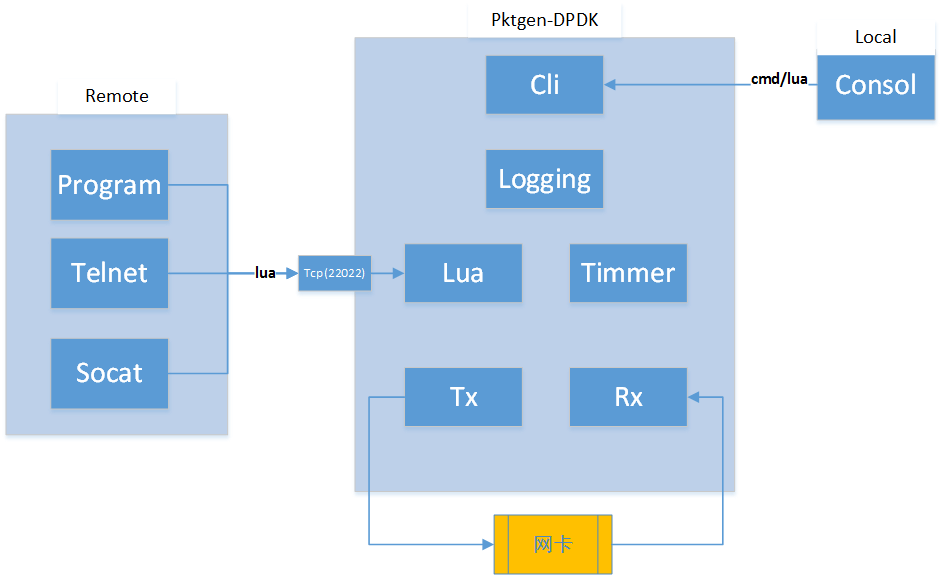
<p><a href="https://git.dpdk.org/apps/pktgen-dpdk">pktgen-dpdk</a>是由intel团队成员将内核版本的pktgen移植到dpdk之上的版本，与dpdk同步版本更新最积极，目前使用的是20.11版本。
<img src="/assets/images/dpdk/pktgen-dpdk-architecture.png" alt="pktgen-dpdk-architecture.png" /></p>

<h4 id="moongen">moongen</h4>
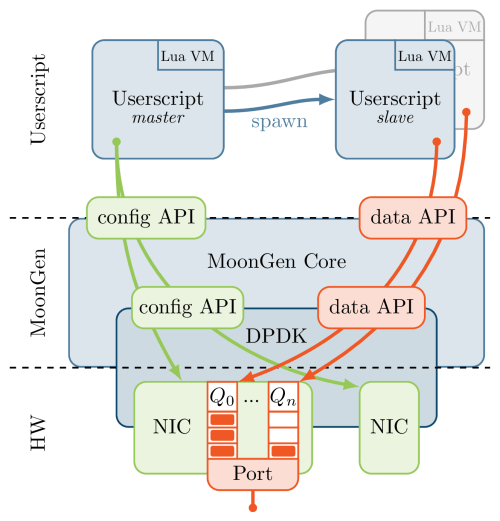
<p><a href="https://github.com/emmericp/MoonGen">moongen</a>是由个人开发和维护的版本，dpdk使用的是17.08，已经有3年没有更新了。
<img src="/assets/images/dpdk/moongen-architecture.png" alt="moongen-architecture.png" /></p>

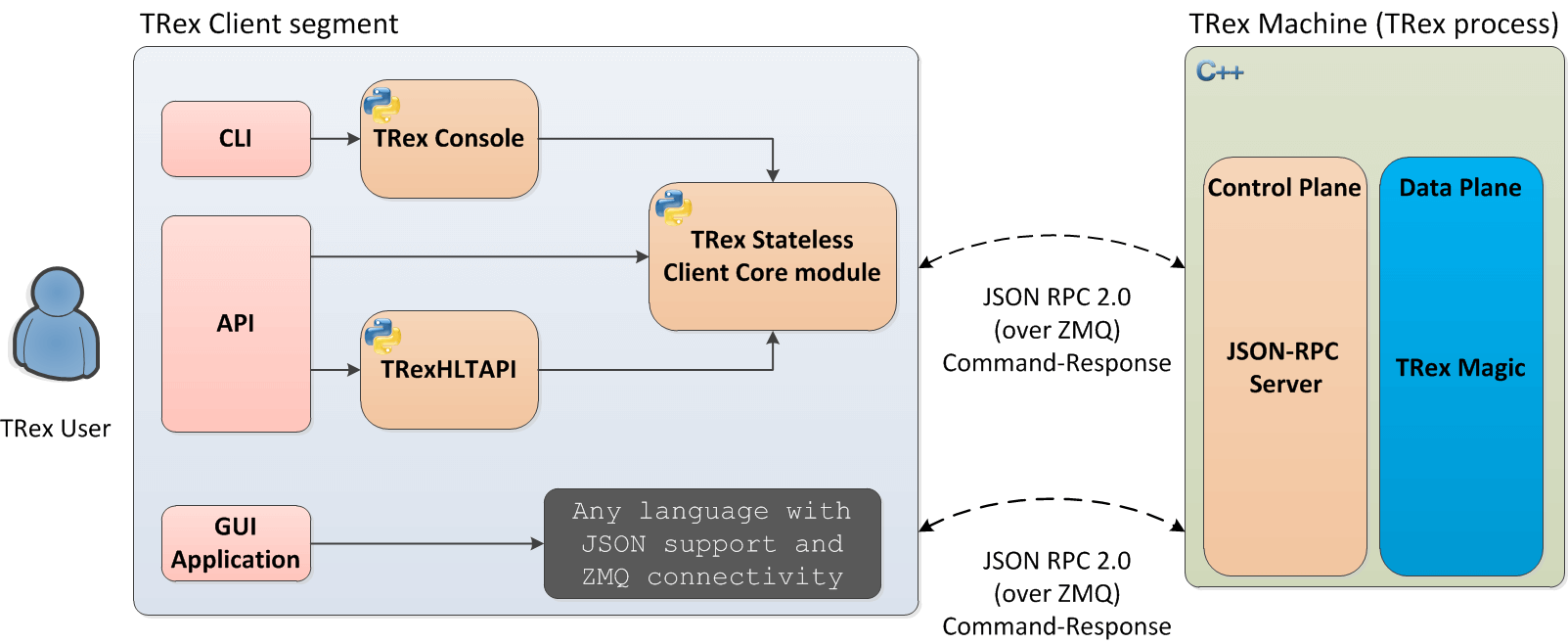
<h4 id="t-rex">t-rex</h4>
<p><a href="https://github.com/cisco-system-traffic-generator/trex-core">t-rex</a>是由设备厂商思科维护的版本，社区活跃，版本更新迅速，dpdk目前已经可以兼容最新的21.02。
<img src="/assets/images/dpdk/trex_architecture.png" alt="trex_architecture.png" /></p>

<h4 id="warp17">warp17</h4>
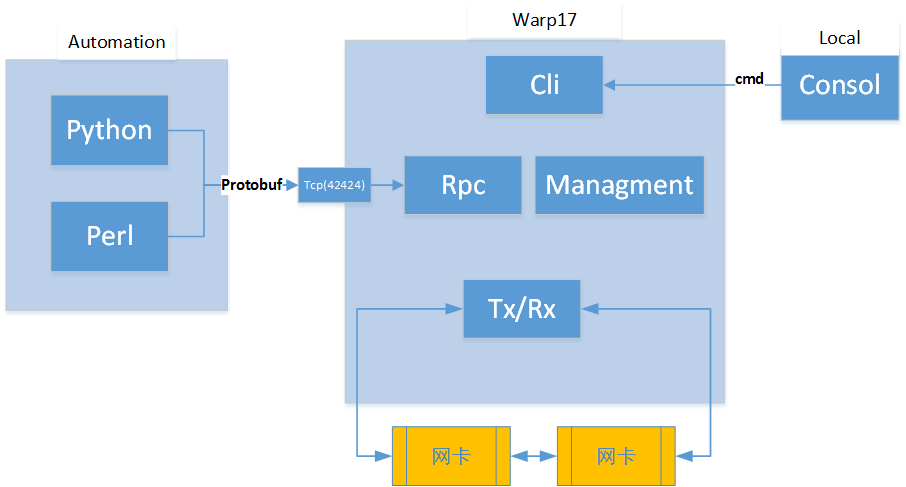
<p><a href="https://github.com/Juniper/warp17">warp17</a>是由设备厂商Juniper维护的版本，社区不是很活跃，版本较慢，dpdk目前使用的19.11。
<img src="/assets/images/dpdk/warp17-architecture.png" alt="warp17-architecture.png" /></p>]]></content><author><name>ZhaoTao</name></author><category term="DPDK" /><summary type="html"><![CDATA[基于DPDK的发包工具，具有开源、软件实现、性能高等优点，可用于测试交换机、路由器、负载均衡器、防火墙、IPS、IDS等网络层设备及应用。常用工具有pktgen-dpdk,moongen,t-rex,warp17等，本文主要说明这四个软件的架构。]]></summary></entry><entry><title type="html">golang中的mysql driver是怎样接收多条结果的？</title><link href="http://blog.tom86.top/libs/2021/05/14/libs-golang-mysql/" rel="alternate" type="text/html" title="golang中的mysql driver是怎样接收多条结果的？" /><published>2021-05-14T01:26:00+00:00</published><updated>2021-05-14T01:26:00+00:00</updated><id>http://blog.tom86.top/libs/2021/05/14/libs-golang-mysql</id><content type="html" xml:base="http://blog.tom86.top/libs/2021/05/14/libs-golang-mysql/"><![CDATA[<p>当golang中使用sql查询数据库获取多条结果时，一般采用db.Query() + rows.Next() + rows.Scan()三个函数调用，那每个函数完成的具体功能到底是啥呢？</p>

<h3 id="接口与driver">接口与driver</h3>
<p>golang中数据库的实现方式为：<a href="https://golang.org/pkg/database/sql/">database/sql</a>提供公共的数据库操作接口，具体的数据库驱动由各个数据库自己实现，比如<a href="https://github.com/go-sql-driver/mysql">go-sql-driver/mysql</a>，关系图如下：<br />
<img src="/assets/images/lib/sql-and-database.png" alt="sql-and-database.png" /><br />
图片来源：<a href="https://draveness.me/golang/docs/part4-advanced/ch09-stdlib/golang-database-sql/">https://draveness.me/golang/docs/part4-advanced/ch09-stdlib/golang-database-sql/</a></p>

<h3 id="mysql客户端-服务端交互">mysql客户端-服务端交互</h3>
<div class="language-plaintext highlighter-rouge"><div class="highlight"><pre class="highlight"><code>1. 三次握手建立 TCP 连接。

2. 建立 MySQL 连接，也就是认证阶段。
    服务端 -&gt; 客户端：发送握手初始化包 (Handshake Initialization Packet)。
    客户端 -&gt; 服务端：发送验证包 (Client Authentication Packet)。
    服务端 -&gt; 客户端：认证结果消息。

3. 认证通过之后，客户端开始与服务端之间交互，也就是命令执行阶段。
    客户端 -&gt; 服务端：发送命令包 (Command Packet)。
    服务端 -&gt; 客户端：发送回应包 (OK Packet, or Error Packet, or Result Set Packet)。

4. 断开 MySQL 连接。
    客户端 -&gt; 服务器：发送退出命令包。

5. 四次握手断开 TCP 连接。
</code></pre></div></div>
<p>引用：<a href="https://gohalo.me/post/mysql-protocol.html">https://gohalo.me/post/mysql-protocol.html</a></p>

<h3 id="响应报文格式">响应报文格式</h3>
<p>响应报文采用统一格式，如下：<br /></p>
<div class="language-plaintext highlighter-rouge"><div class="highlight"><pre class="highlight"><code>+-------------------+--------------+---------------------------------------------------+
|      3 Bytes      |    1 Byte    |                   N Bytes                         |
+-------------------+--------------+---------------------------------------------------+
|&lt;= length of msg =&gt;|&lt;= sequence =&gt;|&lt;==================== data =======================&gt;|
|&lt;============= header ===========&gt;|&lt;==================== body =======================&gt;|
</code></pre></div></div>
<blockquote>
  <p>说明：</p>
  <ol>
    <li>3字节：报文长度；</li>
    <li>1字节：序号，每次客户端发起请求时，序号值都会从 0 开始计算。当一个请求由多个响应报文组成时，用来确定报文顺序，如果接收报文失序，则报错。</li>
    <li>N字节：具体数据部分。</li>
  </ol>
</blockquote>

<p>引用：<a href="https://gohalo.me/post/mysql-protocol.html">https://gohalo.me/post/mysql-protocol.html</a></p>

<h3 id="resultset报文">ResultSet报文</h3>
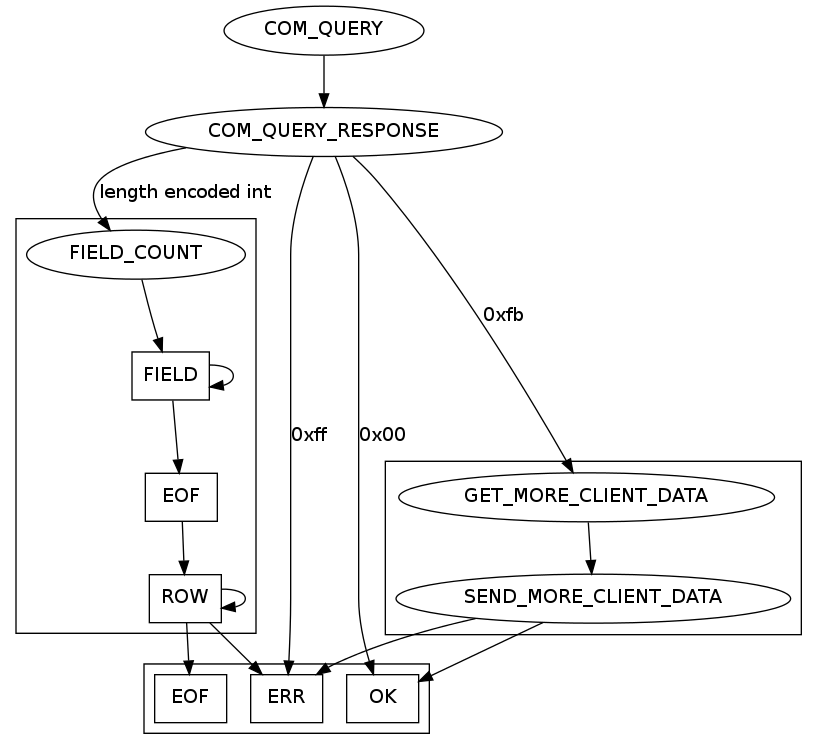
<p>响应报文包含三种：OK报文, Error报文, Result Set报文，下面主要说明最复杂的ResultSet报文：
<img src="/assets/images/lib/sql-response-pack.png" alt="sql-response-pack.png" /></p>
<blockquote>
  <p>说明：
图表包含了sql请求的所有响应情况，其中最左边方框+EOF/ERR报文就表示一个完整的ResultSet报文，主要包括五组报文：</p>
  <ol>
    <li>ResultSetHeaderPacket：结果集头报文，包含列的个数信息，报文个数=1；</li>
    <li>ColumnsPackets：列说明报文，包含每个列的具体说明，报文个数=column_count；</li>
    <li>EOFPacket：表示列说明报文结束，报文个数=1；</li>
    <li>RowsPackets：行内容报文，包含一行的具体内容，报文个数=row_num；</li>
    <li>EOFPacket/ERRPacket：表示整个Result Set报文的结束，报文个数=1；</li>
  </ol>
</blockquote>

<p>参考：<a href="https://dev.mysql.com/doc/internals/en/com-query-response.html#packet-ProtocolText::Resultset">https://dev.mysql.com/doc/internals/en/com-query-response.html#packet-ProtocolText::Resultset</a></p>

<h3 id="resultset报文例子">ResultSet报文例子</h3>
<div class="language-plaintext highlighter-rouge"><div class="highlight"><pre class="highlight"><code>01 00 00 01 01|27 00 00    02 03 64 65 66 00 00 00    .....'....def...
11 40 40 76 65 72 73 69    6f 6e 5f 63 6f 6d 6d 65    .@@version_comme
6e 74 00 0c 08 00 1c 00    00 00 fd 00 00 1f 00 00|   nt..............
05 00 00 03 fe 00 00 02    00|1d 00 00 04 1c 4d 79    ..............My
53 51 4c 20 43 6f 6d 6d    75 6e 69 74 79 20 53 65    SQL Community Se
72 76 65 72 20 28 47 50    4c 29|05 00 00 05 fe 00    rver (GPL)......
00 02 00                                              ...
</code></pre></div></div>
<p>说明：
包含5种报文：</p>
<ol>
  <li>
    <p>length = 01 00 00, sequence_id = 01(<a href="https://dev.mysql.com/doc/internals/en/integer.html#packet-Protocol::LengthEncodedInteger">ResultSetHeaderPacket</a>)</p>

    <ul>
      <li>column_count = 01 (1)</li>
    </ul>
  </li>
  <li>
    <p>length = 27 00 00, sequence_id = 02(<a href="https://dev.mysql.com/doc/internals/en/com-query-response.html#packet-Protocol::ColumnDefinition">ColumnsPackets</a>)</p>

    <ul>
      <li>
        <p>catalog = 03 64 65 66 (“def”)</p>
      </li>
      <li>
        <p>schema = 00 (“”)</p>
      </li>
      <li>
        <p>table = 00 (“”)</p>
      </li>
      <li>
        <p>org_table = 00 (“”)</p>
      </li>
      <li>
        <p>name = 11 40 40 76 65 72 73 69 6f 6e 5f 63 6f 6d 6d 65 6e 74 (“@@version_comment”)</p>
      </li>
      <li>
        <p>org_name = 00 (“”)</p>
      </li>
      <li>
        <p>filler_1 = 0c</p>
      </li>
      <li>
        <p>character_set = 08 00 (latin1_swedish_ci)</p>
      </li>
      <li>
        <p>column_length = 1c 00 00 00 (28)</p>
      </li>
      <li>
        <p>column_type = fd (Protocol::MYSQL_TYPE_VAR_STRING)</p>
      </li>
      <li>
        <p>flags = 00 00</p>
      </li>
      <li>
        <p>decimals = 1f (127)</p>
      </li>
      <li>
        <p>filler_2 00 00</p>
      </li>
    </ul>
  </li>
  <li>
    <p>length = 05 00 00, sequence_id = 03(<a href="https://dev.mysql.com/doc/internals/en/packet-EOF_Packet.html">EOFPacket</a>)</p>

    <ul>
      <li>
        <p>fe (EOF indicator)</p>
      </li>
      <li>
        <p>warning_count = 00 00 (0)</p>
      </li>
      <li>
        <p>status_flags = 02 00 (Protocol::StatusFlags = SERVER_STATUS_AUTOCOMMIT )</p>
      </li>
    </ul>
  </li>
  <li>
    <p>length = 05 00 00, sequence_id = 04(<a href="https://dev.mysql.com/doc/internals/en/com-query-response.html#packet-ProtocolText::ResultsetRow">RowsPackets</a>)</p>

    <ul>
      <li>
        <p>(ProtocolText::ResultsetRow)</p>
      </li>
      <li>
        <p>1c 4d 79 53 51 4c 20 43 6f 6d 6d 75 6e 69 74 79 20 53 65 72 76 65 72 20 28 47 50 4c 29 (length = 28, string = “MySQL Community Server (GPL)”)</p>
      </li>
    </ul>
  </li>
  <li>
    <p>length = 05 00 00, sequence_id = 05(<a href="https://dev.mysql.com/doc/internals/en/packet-EOF_Packet.html">EOFPacket</a>)</p>

    <ul>
      <li>
        <p>fe (EOF indicator)</p>
      </li>
      <li>
        <p>warning_count = 00 00 (0)</p>
      </li>
      <li>
        <p>status_flags = 02 00 (Protocol::StatusFlags = SERVER_STATUS_AUTOCOMMIT )</p>
      </li>
    </ul>
  </li>
</ol>

<p>参考：<a href="https://dev.mysql.com/doc/internals/en/protocoltext-resultset.html">https://dev.mysql.com/doc/internals/en/protocoltext-resultset.html</a></p>

<h3 id="dbquery">db.Query</h3>
<div class="language-plaintext highlighter-rouge"><div class="highlight"><pre class="highlight"><code>接口调用：db.Query ===&gt; db.QueryContext ===&gt; db.query ===&gt; db.conn(获取连接) ===&gt; db.queryDC ===&gt; db.ctxDriverQuery ===&gt; 
driver调用：driver.QueryContext ===&gt; driver.query ===&gt; driver.writeCommandPacketStr(发送sql请求) ===&gt; driver.readResultSetHeaderPacket(读取并解析ResultSetHeaderPacket) ===&gt; driver.readColumns(读取并解析ColumnsPackets) &lt;===&gt; until EOFPacket(读到EOF报文表示列解析完成).
</code></pre></div></div>

<h3 id="rowsnext">rows.Next</h3>
<div class="language-plaintext highlighter-rouge"><div class="highlight"><pre class="highlight"><code>接口调用：rows.Next ===&gt; rows.nextLocked 
driver调用：rows.Next ===&gt; rows.readRow ===&gt; rows.readRowPacket(读取并解析RowsPackets) &lt;===&gt; until EOFPacket((读到EOF报文表示行解析完).
</code></pre></div></div>

<h3 id="rowsscan">rows.Scan</h3>
<div class="language-plaintext highlighter-rouge"><div class="highlight"><pre class="highlight"><code>接口调用：rows.Scan ===&gt; convertAssignRows(将数据库行转为golang内部结构体).
</code></pre></div></div>]]></content><author><name>ZhaoTao</name></author><category term="Libs" /><summary type="html"><![CDATA[当golang中使用sql查询数据库获取多条结果时，一般采用db.Query() + rows.Next() + rows.Scan()三个函数调用，那每个函数完成的具体功能到底是啥呢？]]></summary></entry><entry><title type="html">DNS Flag Day 2019</title><link href="http://blog.tom86.top/dns/2021/05/11/dns-flag-day-2019/" rel="alternate" type="text/html" title="DNS Flag Day 2019" /><published>2021-05-11T06:37:00+00:00</published><updated>2021-05-11T06:37:00+00:00</updated><id>http://blog.tom86.top/dns/2021/05/11/dns-flag-day-2019</id><content type="html" xml:base="http://blog.tom86.top/dns/2021/05/11/dns-flag-day-2019/"><![CDATA[<p>由于线上运行的dns系统实现较多，且对标准的支持程度差别较大，导致各系统交互时，引入不必要的兼容性要求，使整个DNS系统代码变得复杂且效率降低。为了解决这个问题，由国外的一些大型的dns服务商牵头，包括ISC(bind), CZ.NIC(knot), Google, Powerdns, 思科，cloudflare等，发起了向标准协议对齐，对非标准的实现不再兼容的倡导，此倡导被称为DNS Flag Day.</p>

<h3 id="dns-flag-day-2019">DNS Flag Day 2019</h3>
<p><a href="https://dnsflagday.net/2019/">2019.2.1</a>为第一次共识的截止时间，此次共识主要解决授权服务器对edns的支持不符合协议引入的两个问题：</p>
<ol>
  <li>如果携带edns的请求timeout，则不会重试去掉edns的请求，直接将ns标识为不可用(重试引入时延)。</li>
  <li>如果不支持edns，对于后面dns新特性的支持将受限，比如dnssec。
    <blockquote>
      <p>主要包括三个协议的对齐:<br />
<a href="https://datatracker.ietf.org/doc/html/rfc1035">RFC1035</a> - DNS基础协议；<br />
<a href="https://datatracker.ietf.org/doc/html/rfc2671">RFC2671</a> - EDNS0定义；<br />
<a href="https://datatracker.ietf.org/doc/html/rfc6891">RFC6891</a> - EDNS0更新；<br /></p>
    </blockquote>
  </li>
</ol>

<h4 id="逻辑变更">逻辑变更</h4>
<p>主要包括以下两个方面：</p>
<ol>
  <li>dns-recursor对于某些服务器的EDNS查询超时，不会像以前一样再次发送不携带EDNS的查询，而是认为该服务器上的53服务已经终止。这将导致递归服务器后续的请求不会到达这台DNS服务器，导致同zone的其他NS负载上升。</li>
  <li>按照RFC6891-section7，未包含opt的请求，响应中不得包含opt；如果请求者支持opt，权威自己不支持opt，则权威应该回复formerr，并且不带opt；如果请求者支持opt，权威自己也支持opt，但是请求的opt记录中格式或者值错误，则回复formerr并携带opt记录。</li>
</ol>

<h4 id="递归服务器">递归服务器</h4>
<p>以下开源递归服务器的新版本将不提供兼容：</p>
<ul>
  <li>BIND 9.13.3 (development) and 9.14.0 (production)</li>
  <li>Knot Resolver has already implemented stricter EDNS handling in all current versions</li>
  <li>PowerDNS Recursor 4.2.0</li>
  <li>Unbound 1.9.0</li>
</ul>

<h4 id="授权服务器">授权服务器</h4>
<p>授权服务器的开源实现，基本都是遵循协议的，比如Bind/Knot dns/Powerdns等，当各DNS服务提供商基本都有自己实现的版本，以下服务商已明确支持：</p>
<ul>
  <li><a href="https://community.akamai.com/customers/s/article/CloudSecurityDNSFlagDayandAkamai20190115151216?language=en_US">Akamai</a></li>
  <li><a href="https://support.citrix.com/article/CTX241493">Citrix</a></li>
  <li><a href="https://www.bluecatnetworks.com/blog/dns-flag-day-is-coming-and-bluecat-is-ready/">BlueCat</a></li>
  <li><a href="http://www.efficientip.com/dns-flag-day-notes/">efficient iP</a></li>
  <li><a href="https://support.f5.com/csp/article/K07808381?sf206085287=1">F5 BIG-IP</a></li>
  <li><a href="https://groups.google.com/g/public-dns-announce/c/-qaRKDV9InA/m/CsX-2fJpBAAJ?pli=1">Google</a></li>
  <li>Juniper: Older versions of the Juniper SRX will drop EDNS packets by default. The workaround is to disable DNS doctoring via # set security alg dns doctoring none. Upgrade to latest versions for EDNS support.</li>
  <li><a href="https://blogs.infoblox.com/community/dns-flag-day/?es_p=8449211">Infoblox</a></li>
  <li><a href="https://azure.microsoft.com/en-us/updates/azure-dns-flag-day/">Microsoft Azure</a>, <a href="https://support.microsoft.com/en-us/topic/windows-server-domain-name-system-dns-flag-day-compliance-85d14b63-5907-1ac2-d254-fcb1755597db">Microsoft DNS</a></li>
  <li><a href="https://kb.pulsesecure.net/articles/Pulse_Secure_Article/KB43996">Pulse Secure</a></li>
</ul>

<h4 id="测试方法">测试方法</h4>
<ol>
  <li>web测试方法 - https://ednscomp.isc.org/ednscomp；</li>
  <li>源码测试方法 - https://gitlab.isc.org/isc-projects/DNS-Compliance-Testing；</li>
  <li>批量测试方法 - https://gitlab.nic.cz/knot/edns-zone-scanner/-/tree/master；</li>
  <li>dig测试方法 - https://kb.isc.org/docs/edns-compatibility-dig-queries；</li>
</ol>]]></content><author><name>ZhaoTao</name></author><category term="DNS" /><summary type="html"><![CDATA[由于线上运行的dns系统实现较多，且对标准的支持程度差别较大，导致各系统交互时，引入不必要的兼容性要求，使整个DNS系统代码变得复杂且效率降低。为了解决这个问题，由国外的一些大型的dns服务商牵头，包括ISC(bind), CZ.NIC(knot), Google, Powerdns, 思科，cloudflare等，发起了向标准协议对齐，对非标准的实现不再兼容的倡导，此倡导被称为DNS Flag Day.]]></summary></entry></feed>